When a website starts feeling slow, the first thing most of us blame is the platform. I know I did. I blamed WordPress, then my hosting company, then the server. At one point I paid for a more expensive hosting package, convinced that throwing money at the problem would fix it.
It didn't.
Looking back, I spent more time moving my website than I ever spent working out what was actually slowing it down. And here's the ironic part: moving hosting did turn out to be one of the best things I did - just not for the reason I thought.
The day I found the real problem
A few years ago I'd decided my WordPress site had simply become too slow. Pages dragged. The admin area took forever to load. I was sure the hosting company was to blame, so I upgraded. Still slow. I upgraded again. Still slow. In the end I moved everything to a completely different host.
At first it felt like the move had worked and the site was noticeably quicker. But the real change happened while I was rebuilding after the migration. As I put things back, I started leaving out what I no longer needed: old plugins, widgets I'd installed years earlier and forgotten, tracking scripts from tools I'd tested once, marketing services I'd long since stopped using.
With each thing I removed, the site got a little faster going from 10 seconds down to 2. I wish I had kept the screenshots I took at the time because it was amazing to watch it happening. It wasn't the magic hosting company. It was that I'd finally cleared out years of digital clutter, and that changed how I've thought about website speed ever since.
Building Djangify changed my mind even more
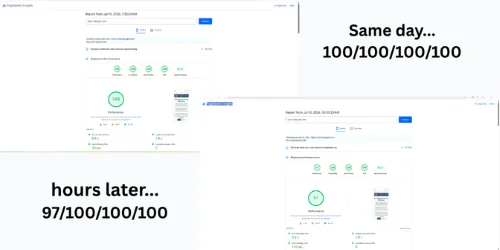
These days I've built my own ecommerce builder, and one of the things I test constantly is Google's PageSpeed Insights and Lighthouse. Some days Djangify scores 100. Some days it scores 97 - with nothing in the code changed. Same platform, same page, different number.
That's because Lighthouse isn't measuring your site in perfect lab conditions. It runs a simulated test using varying network speeds, CPU throttling and timing, and those small variations move the score a few points either way. A site that scores 97 today and 100 tomorrow isn't broken. It's doing exactly what these tools are designed to do.
Which is why chasing a perfect score matters far less than building something genuinely fast for real people. xxxxxxxxxxxxxxxxxxxxxxxxxxxxxxxxxxxxxxxxxxxxxxx
The platform is the easiest thing to blame
When something feels slow, we look for one big cause. The hosting must be bad. WordPress is too heavy. The platform can't cope. Sometimes that's true. But far more often, slowness is dozens of small decisions stacked up over months or years — an extra tracking script, a chat widget, an abandoned plugin, three different font libraries, an Instagram feed, a review tool, another analytics tag.
On its own, none of it looks like much. Together, they turn your site into something that has to phone half a dozen other companies before it's even finished loading itself.
Think of someone carrying one shopping bag. No problem. Add a second, then a third, then a fourth, and eventually they're struggling to walk — even though no single bag is heavy. Websites work the same way. Each script, request, plugin, embed and font is small on its own. Stacked together, they're the reason your visitor is still waiting.
What actually slows most sites down
After building Djangify and spending far too many hours measuring this stuff, here's what I see causing the biggest problems — and what I'd actually do about each one.
Audit your third-party scripts. Marketing platforms, analytics, heat maps, live chat, cookie managers, social widgets — each one has to download and run its own JavaScript, and while it does, it's tying up the browser's main thread. That's the single lane everything else is queued behind, so the page can look finished but not actually respond to a click or tap yet. Keep the ones that earn their place; remove the rest.
Delete plugins you no longer use. This was my biggest mistake. You install something to test an idea, forget it's there, and months later it's still loading code on every single page. Go through the list and switch off anything you can't remember deciding to keep.
Compress your images and convert them to WebP. A hero image doesn't need to be 8MB. Modern formats like WebP cut the file size dramatically with no real drop in quality — usually the biggest, easiest win on the whole page.
Trim your font families. Load five fonts with six weights each and you've handed the browser a surprising amount of extra work. Pick one or two, drop the weights you never use.
Reconsider embedded content. Maps, Instagram feeds, Facebook posts, calendars, YouTube videos — every embed is another conversation the browser has to finish before the page is ready. Ask whether each one is worth what it costs, and load it only where it genuinely adds something.
Cut the tracking pixels you don't read. Every marketing tool wants its own. Test enough of them over the years and you end up with far more than you'll ever need. If you're not looking at the data, remove the pixel.
Should you worry about hitting 100 in Lighthouse?
Personally, no. Lighthouse is an excellent diagnostic tool and I use it regularly — but I don't treat it as a report card. A 97 doesn't mean your site is worse than one scoring 100. What actually matters is whether people can read your content, browse your products and check out without getting frustrated. I'd rather spend an afternoon improving the checkout than chasing three points most visitors will never notice.
Start with what you control
If your site feels slow, don't jump straight to "I need a new platform." Before you spend money on a migration or a pricier host, ask yourself a few honest questions:
- How many plugins am I actually using?
- Which marketing tools am I still paying for?
- Which scripts haven't earned their place in months?
- How many third-party widgets load on every page?
- Are my images optimised?
- Do I really need everything that's running?
The answers might surprise you. They surprised me.
Final thoughts
One of the unexpected upsides of building Djangify is seeing website speed from both sides. I've been the owner convinced the hosting was the problem. I've also been the developer watching every request, seeing exactly what the browser is doing behind the scenes. Both taught me the same thing.
A fast website usually isn't the result of one big decision. It's the result of a lot of small, sensible ones, and more often than not, the quickest improvement isn't adding something new, it's removing what you no longer need.