Turn your articles into pages your readers use, not just scroll past.
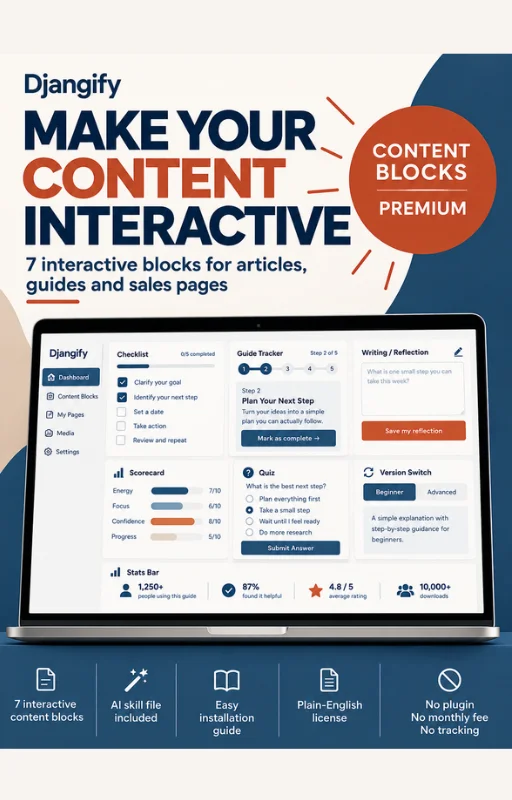
Djangify Content Blocks Premium is seven interactive blocks for any article, info page or sales page. A reader can tick off a checklist, work through a guide, write answers in a text box, score themselves, take a short quiz and pick the version that fits them. Their progress is saved on their own device, so it is still there when they come back.
£47 starter price. One purchase. Use it on every site you own and on your clients' sites.
7 interactive blocks · Matches your brand colors · AI skill file · Start here checklist · Plain-English license · No plugin, no monthly fee, no tracking
Why good articles still go unread
A long article can be well written and still get skimmed. The reader nods, scrolls and leaves, and nothing they read turns into something they do. The usual fixes are a quiz or form plugin with a monthly fee, or a custom page that breaks the next time something updates.
These blocks sit between those two. They are plain HTML that your AI assistant writes from one skill file, plus one script you add once. You never paste code into an article.
Who it is for
You already write guides, posts or lessons for your business, and you sell digital products, courses, coaching or templates. You want readers to stay longer and act on what they read, and you would rather not pay for another tool every month.
Reading time7 min
Length1,700 words
Last updatedOctober 5, 2026
LevelBeginner
Key takeaways
- Seven interactive blocks: a checklist, a guide, a writing box, a scorecard, a quiz, a version switch and a stats bar.
- Your AI assistant writes each block from one skill file. You never paste a script into an article.
- The blocks match your brand colors, and you can change any block by telling your AI what you want.
- Readers' progress is saved in their own browser. You never see it, and nothing is sent anywhere.
- It works on Djangify and on any site that accepts HTML and lets you add one line of code.
Try the blocks on this page
Everything below is one of the seven blocks, working. Tick, type and click. Come back to this page tomorrow and your progress is still here.
Quiz
Is the premium pack right for you?
- How do readers use your articles today?
- They read and leave
- Many already reply or buy
- What do you sell or plan to sell?
- Guides, courses, coaching or templates
- Something else, or nothing yet
- What would you like your readers to do on the page?
- Tick, write, score themselves or choose
- Just see a better layout
The premium pack fits you
Your readers can do things on the page, and you sell something they can do next. Scroll down to the price and get the pack.
Go to the priceStart with the free blocks
The free blocks make an article easier to read and scan. Add the premium pack when you want readers to act.
Read the free blocks article
What you can do with them
Choose what you publish. Each tab shows how the same seven blocks work for you, with ideas you can use today.
Courses
Make every lesson something students do, not only read
- Guide Tracker for each lesson. Students tick Done on every step, watch the progress bar fill and pick up where they stopped.
- Reflect and Write at the end of a lesson. They answer two or three questions in their own words, then copy, download or print the answers as a worksheet.
- Scorecard before module one. Students rate where they are today and see which module to begin with.
- Quiz on your sales page. Visitors answer three questions and land on the course that fits them.
A student who can see their progress has a reason to come back tomorrow.
Templates
Help buyers get from download to done
- Saved Checklist for setup. Buyers tick off each job, and the row turns green when it is done.
- Switch for versions. Put the Windows and Mac steps, or two apps, in one block so each buyer sees only their own.
- Guide Tracker for the first use. Walk them through the template one step at a time.
- Quiz for bundles. Three questions point a buyer to the right template in your range.
- Stats Bar with level and last updated. Buyers see at a glance that the page is current.
Fewer questions to your inbox, because the answers are on the page in the order people need them.
Coaching
Give visitors a first step before they ever book
- Scorecard as a self check. A visitor rates five statements and sees a result band that points to your offer.
- Pick Your Path Quiz. Send each person to the right program, workshop or free guide.
- Reflect and Write as a pre-call worksheet. Clients write their answers on the page, print them and bring them to the call.
- Saved Checklist for before session one. Clients tick off what to prepare.
People arrive having already done some of the thinking, so your first hour goes further.
Blog
Keep readers on the page and move them to your next step
- Stats Bar under the headline. Reading time and length are counted for you, and you add last updated and level.
- Saved Checklist at the end of a how-to. Readers tick off what they have done, so the post becomes a tool they return to.
- Quiz in the middle of a long post. Readers choose their situation and get the section or product that fits.
- Switch for two audiences. One post, with a beginner view and an advanced view.
Readers who do something on the page stay longer, and you give them a clear next step.
Self check
How passive is your content?
- My readers only read. They never do anything on the page.
- Many readers leave before they reach my offer.
- Readers who come back find nothing saved from last time.
- Mostly interactive alreadyYou are ahead of most. The checklist and quiz blocks will still help you point readers to your next step.
- A few easy winsStart with a Saved Checklist in your most popular article and a Stats Bar at the top.
- Big opportunityAlmost every article you have could hold a block. Start with your top three by traffic.
What is in the pack
What you get
Tick off what you are getting
- Seven interactive blocksStats Bar, Saved Checklist, Guide Tracker, Reflect and Write, Scorecard, Pick Your Path Quiz and Switch.
- One script fileThe styles are built in and follow your brand colors.
- The AI skill fileWorks with ChatGPT, Claude, Gemini and Codex, with a place to fill in your brand colors.
- A start here pageThe three setup steps as a checklist you can tick off as you go.
- An examples pageAll seven blocks working, ready to open and try.
- A plain-English licenseUse it on your sites and your clients' sites.
Set it up in three steps
Guide
From download to your first block
- Download the packYou get the files straight after purchase. Open the start here page to follow along.
- Add the script once and tell your AI your brand colorsOne line in the footer code of your site, or in
base.html on a Djangify shop. The skill file has a place to fill in your brand colors, font and text size.
What if my site builder has no footer code area?
Ask your AI assistant where your site builder lets you add code that runs on every page. Most have a place for it, often called code injection or custom code.
- Ask your AI for a blockGive it the skill file and your text, then name the block you want.
Reflect
Plan your first block
- Which of your articles gets the most visitors?That is where a block pays off first.
- What should a reader do after reading it?A tick, a written answer, a score or a choice.
Change any block to fit your brand
Every block is plain HTML styled by one set of rules. That means you can change how it looks and how big it is by telling your AI what you want, in plain words. It makes the change once, and every block of that kind follows.
Things you can ask for
Change the look
- "Use my brand colors for every button."
- "Make the quiz background light green."
- "Give the checklist a white background with a thin border."
- "Round the corners a little more."
- "Use my site's font inside the blocks."
Change the size
- "Make the buttons larger."
- "Make the text in the writing box bigger."
- "Make the progress bar thicker."
- "Add more space between the steps."
- "Match the text size to the rest of my site."
Copy this
Copy
Here is the skill file for my content blocks. My brand colors are [your main color], [your second color] and [your light background color]. My site's font is [your font] and its text size is [your text size]. Add these to my site as the skill file describes. Then make the buttons a little larger and give the quiz a light green background.
Free blocks and premium blocks
What each set does
| Free blocks | Premium blocks |
|---|
| Reader can | Read, scan and copy | Tick, write, score, choose and save |
|---|
| Saved between visits | No | Yes, on the same device |
|---|
| Needs a script | Only for the Copy button | One script, added once |
|---|
| Price | Free | £47 starter price |
|---|
Questions
Do I need to know how to code?
No. You add one line to your site once, and your AI assistant writes the blocks. If you can ask an AI for something and follow the steps it gives you, you can use this.
Does it only work on Djangify?
No. It works on any site that accepts HTML and lets you add one line of code to every page. The install steps cover Djangify and other sites.
Will it match my brand?
Yes. The blocks use your site's main, accent and secondary colors, and mix their light backgrounds from them. On Djangify they follow your theme settings. On other sites you give your AI your brand colors once, using the place for them in the skill file, and it writes a short snippet for your site.
Will it match my site's font and text size?
Yes. By default the blocks use the same font as your page, at a text size of 18px, with one consistent scale for titles and descriptions. If your site's text is larger or smaller, tell your AI your font and text size once, using the optional rows in the skill file, and it sets them for every block.
Can I change how a block looks?
Yes. Tell your AI what you want, such as a lighter background, a larger button or more space between steps. It changes the block's rules once, and every block of that kind follows.
Where is my reader's progress stored?
In the reader's own browser, on the device they used. You never see it and nothing is sent anywhere. It does not follow a reader to another device, and clearing browser data removes it. The writing box has copy, download and print buttons so readers can keep their answers.
What happens if I edit the article later?
Each item has a fixed id, so you can reword and reorder items without losing a reader's progress. Reading time and length update on their own. The last updated date is typed by hand, so change it when you edit.
Will the price change?
The starter price will go up when I reopen the pack with more resources.
Your license, in plain English
- Use it everywhere you publish. Your own sites and your clients' sites, as many as you like.
- Change it. Restyle and rebrand it.
- Build it into what you sell. Courses, templates and guides, as finished pages.
- Do not resell the pack. You cannot sell or give away the files themselves as a block pack of your own.
Get the pack
Seven interactive blocks, the AI skill file, the start here page, the examples page and the license. Coming soon.
Djangify Content Blocks Premium: £47 starter price, one purchase.
Coming Soon
This product is not yet available for purchase.