Claude Artifacts have quietly become one of the most useful things a digital-product seller can offer if you are looking to provide your customers with digital experiences. They are small, self-contained interactive tools that run right in the browser so no need to download or install anything. Your visitor clicks, uses the tool live, and gets a result - plus on Djangify you can also invite them to get their results via email and sign up to your newsletter. That makes them perfect to package and sell as hosted tools and also to offer as free tools.
The best part is that they work in almost any niche. A calculator is a calculator whether you sell to bakers, bookkeepers, or dog groomers, only the inputs change. Below are the main types of Claude Artifacts you can build (as of August 2026 because these things change all the time) and sell. They are grouped by what your customer is actually trying to do when they reach for one.
Group your ideas by buyer intent
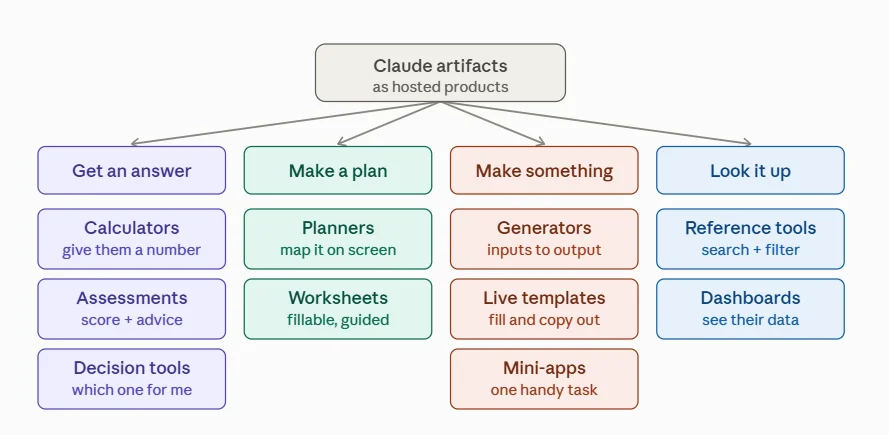
Before you build anything, it helps to think about the intent behind the purchase. People don't buy a “tool” they buy an outcome. There are four broad intents, and every artifact type below slots into one of them:
- Get an answer — they want certainty about their own situation.
- Make a plan — they want to map something out on screen.
- Make something — they want a finished output from a few details.
- Look it up — they want fast access to organised knowledge or their own data made visible.
Pick the intent your audience has, then build the tool that serves it. Here are the ten use cases that cover it.
1. Get an answer
Calculators & estimators
The workhorse of digital products. Pricing calculators, ROI estimators, “how much do I need” tools, cost comparisons, savings projections, quantity planners. People happily pay for a number they can trust without doing the maths themselves.
Assessments, quizzes & scorecards
Self-scoring quizzes that produce a personalised result: readiness checks, “what type are you” profilers, skill-level assessments, audits that return a score plus tailored recommendations. They work as a paid product and as a lead magnet.
Decision tools & wizards
Step-by-step “which one is right for me” guides: product or plan selectors, troubleshooting flows, eligibility checkers, and simple “should I / shouldn't I” decision trees. They walk the customer straight to a clear answer.
2. Make a plan
Planners & trackers
Interactive planners that let someone map something out on screen: goal planners, project roadmaps, habit trackers, meal or workout planners, budget layouts, content calendars. The interactivity is exactly what makes it worth paying for over a static PDF.
Interactive worksheets & workbooks
Fillable, self-guiding versions of the worksheets you'd normally sell as a download — with prompts, progress, and a summary at the end. A natural upgrade to any existing course or freebie.
3. Make something
Generators
Tools that produce a finished output from a few inputs: templates, scripts, checklists, outlines, name or idea generators, boilerplate documents, personalised plans. The customer types in their details and gets a ready-to-use result.
Live templates
Instead of selling a static template, sell the live version. The customer fills it in on screen, previews it, and copies the result out. Works for anything from social captions to email sequences to plans.
Mini-apps & utilities
Small single-purpose apps that solve one annoying task: formatters, converters, counters, timers, create content, checklists. Low price point, high perceived usefulness, and easy to bundle with your bigger products.
4. Look it up
Reference & lookup tools
Searchable, filterable libraries: glossaries, swipe files, prompt libraries, resource directories, conversion charts, cheat-sheets. People pay for curated, well-organised knowledge they can query in seconds.
Dashboards & visualisers
Tools that take the customer's own numbers and show them back visually — progress dashboards, before-and-after comparisons, charts, timelines. They turn raw input into something the customer can actually see.
Why hosted tools compliment downloads
After purchase its easy for a PDF to get saved and forgotten. A hosted tool gets used and every time your customer opens it, they're reminded of you. Because a Claude Artifact is a single self-contained file, there's nothing to install and nothing to break. You upload it once, set your price, and it works on any device with a browser.
That also changes what you can charge for. A static worksheet competes on price with every other worksheet. An interactive tool that gives an individual answer specific to that person competes on value and value is much easier to price.
How to sell one as a hosted tool
The workflow is refreshingly short:
- Build your tool as a Claude Artifact (a single HTML file).
- Upload the file and publish it as a hosted tool on your store.
- Set it as free (for lead generation) or paid (for revenue).
- Point your blog posts, emails, and social content at it.
You don't need to be a developer, you don't need a separate app, and you don't need to manage servers because the platform handles hosting, delivery, and checkout for you.
Hosted Tools are one piece of the wider Djangify eCommerce Builder. For the full architecture, self-hosted versus managed hosting, Docker, Stripe, see How Djangify Works: A Clear Architecture Overview.
Ready to sell your own hosted tools?
If you want a shop that can host and sell Claude Artifacts as tools, alongside your other digital products, without touching any of the setup work, our fully managed hosting takes care of it end to end.