When you run an ecommerce site its easy to focus on how many sales you make daily but to really succeed you need more than that as a focus, you need to know what happens after payment. If only a few people actually use your micro-app or download your pdf its worth looking at why. Or if people get part way through and stop that too is worth investigating because the more people who complete a tool/pdf and love it the more chances of testimonials.
The transformation or wins people get are as important as the sale IMHO and so I wanted a plain answer to a plain question: are people using the tools on my sites? Sales figures tell you who bought. They do not tell you who opened what they bought, who got part of the way through, or who never came back. So Djangify now keeps a usage log for hosted tools, with a Tools Dashboard in the admin to read it.
What the dashboard shows
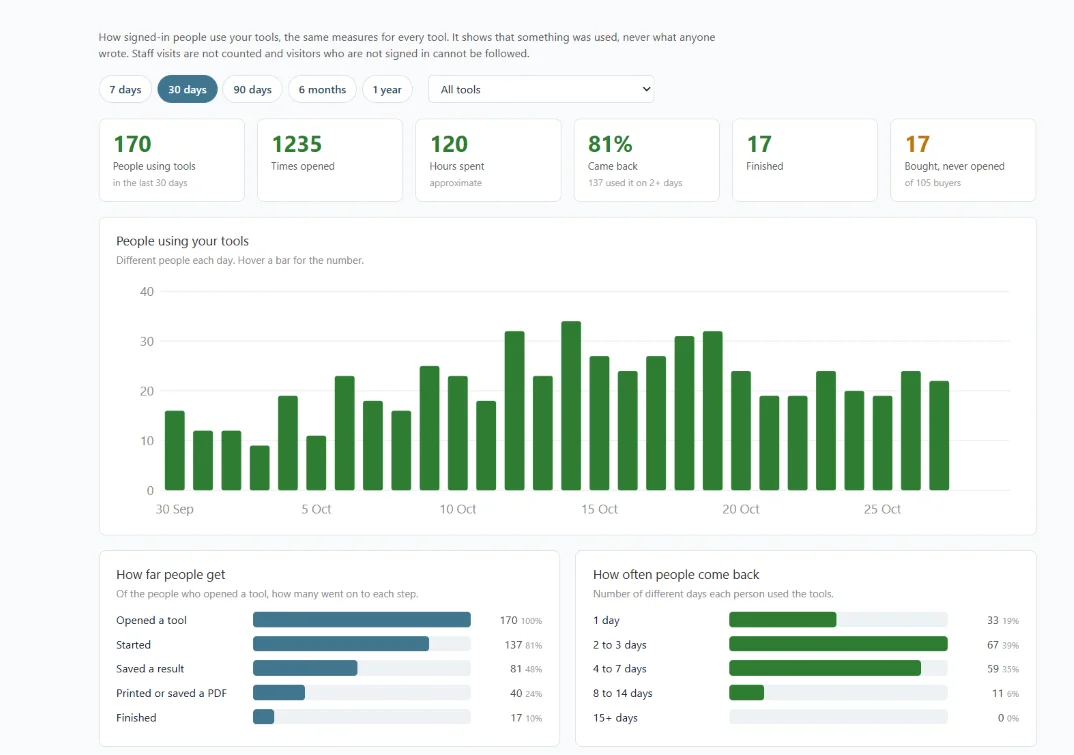
Open Hosted Tools in the admin sidebar, then Tools Dashboard. You can look at the last 7 days, 30 days, 90 days, 6 months or a year, for all your tools or one at a time.
- A chart of how many different people used your tools each day, or each week on the longer ranges.
- How far people get: of everyone who opened a tool, how many started it, saved a result, printed it or saved a PDF, and finished it.
- How often people come back: one day, a few days, or many.
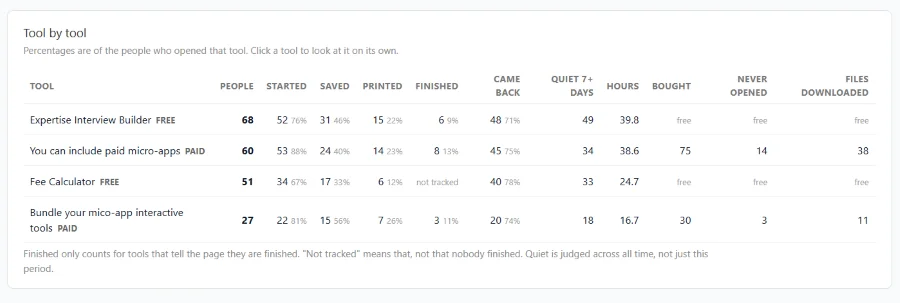
- One row per tool, so you can see which tools get used and which are ignored. For paid tools it also shows how many people bought it, how many never opened it, and how many downloaded the files.
- A short list of buyers who never opened what they bought, and a short list of people who used a tool and then went quiet. Each shows the first 10 names, so the page stays readable on a busy site.
What it records and what it does not
It records that something was used, as counts. One row per person, per tool, per day. It never stores what anyone typed or saved. Only signed-in visitors are counted, because a signed-out visitor cannot be followed from one day to the next, and your own visits as an admin are never counted. Time spent is approximate: it only counts while the tool is open on screen and in use.
Finished needs a signal from the tool
Djangify can tell that someone opened a tool, started it, saved a result or printed it without any help from the tool. It cannot know when someone has finished, because every tool has a different last step. A tool can tell the page by sending one line when the person completes it: parent.postMessage({ __toolComplete: true }, "*").
If you build an interactive tool with Claude to add to your Djangify site it's a good idea to ask it to include the "completes it" signal. A tool that does not send it shows "not tracked" under Finished, which means exactly that. Here's a prompt for you.
I am building an interactive tool as a single self-contained HTML file for my Djangify site. It will run inside a sealed frame on a page of my site. If I have pasted an existing tool below, add the finished signal to that file. If I have described a new tool, build it with the signal included.

The finished signal: when the person completes the last step of the tool, such as seeing their final result or pressing the final button, run this line:

parent.postMessage({ __toolComplete: true }, "*");

Rules:
- Send it only when the person has really finished. Never on page load and never at the first step.
- Send it once per visit, even if they press the final button again.
- Do not store or send anything the person typed.
- Keep everything else in the tool working exactly as it does now.

When you have finished, tell me which step you chose as the finish so I can check it makes sense.
Where to read more
The full explanation is on the Hosted Tools: Free and Paid Interactive Tools page. The dashboard is on every managed hosting plan and on self-hosted sites.