If you've made a digital product, you already know the hard part isn't building it. It is working out what to publish, day after day, in a way that sounds like you.
That's the problem Content Planning Studio is built to solve.
What it is
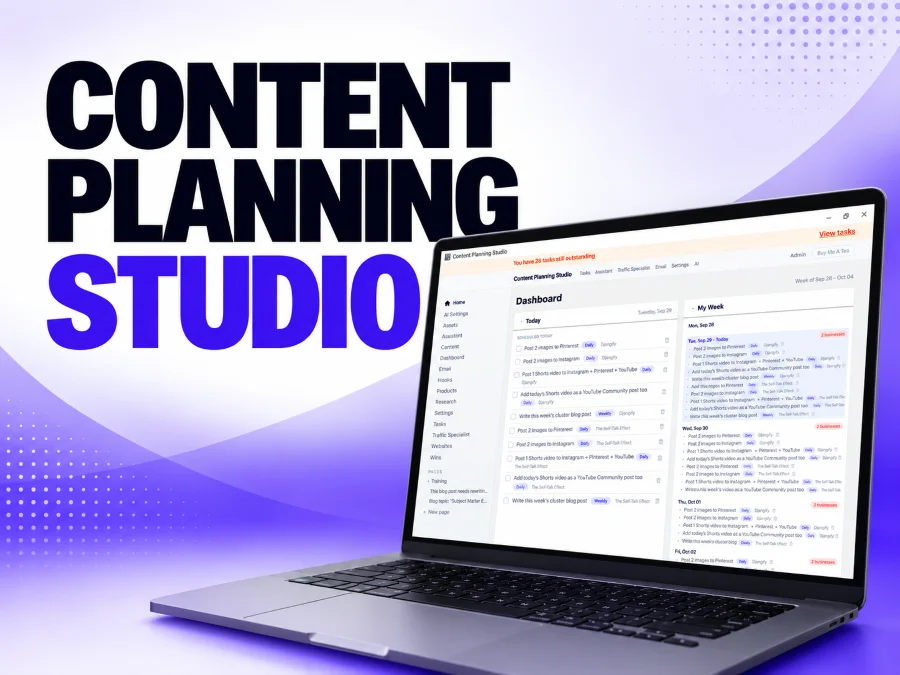
Content Planning Studio is desktop software. An app that lives right on your computer. No subscription, no third party holding your data, nothing running on someone else's server. You tell it about a website and a product, you give it your existing writing as assets, and it plans 30 or 90 days of content for that website in your own voice.
- A 30-Day Content Plan for one product on one website
- A 90-Day Content Plan made of three linked 30-day phases
- A voice profile built from your own writing, so drafts sound like you
- A carousel maker that turns a content idea into 3 to 7 slides, exported as PNG images
- A content calendar, tasks and habits, notes, email sequences and a dashboard showing what is due today
The part that matters: the plan
The 30-Day Content Plan asks you a handful of plain-language questions: which business, which product, who the audience is, how much time you have each day and which platforms you use. It builds a day-by-day plan around the answers using a framework called Know, Like, Trust. Week 1 introduces who you are. Weeks 2 and 3 show your personality and your stories. Week 4 shares proof and depth, then invites people to your email list and your offer.
Each day has a concrete hook, a channel and a call to action, not just "post something." The plan is saved two ways at once: as a readable page, and as 30 real dated tasks on your tracker. Every day gets a log of whether you showed up, what you posted and what happened. Turn on the reminder email and the app tells you what is still outstanding when you close it for the day.
Ninety days
The 90-Day Content Plan runs the same framework across three linked phases of 30 days each. Phases 2 and 3 are not drafted upfront. The app checks how much of the previous phase you completed before it writes the next one, and recommends repeating a phase rather than piling on more work.
How it connects to Djangify
If you're already selling through Djangify, you don't need to set anything up twice. Use Import from Djangify to pull in your brand info and product list with a domain and a read-only export token, then pick which products to bring into your plan.
Free if you already use Claude
Everything the app can do is also available through Claude Desktop via MCP, which means you can run your plans from a Claude Desktop chat window on your existing Claude subscription, with no API key and no extra cost.
Use your AI key
If you prefer OpenAI, Anthropic or Gemini you can add your own AI key and use that instead. Full instructions are provided.
Get the full Content Planning Studio guide
This post is the short version. For the complete walkthrough that includes every feature, every screen, the glossary and a quick-start checklist, download the full documentation below as a PDF.
There are also two training pages available in the documentation area
CPS Training material available here
Create Your First 30-Day Content Plan
Content Planning Studio will be available from October 2026.
Content Planning Studio is built by Djangify with AI Assisted help from Claude Code