Running an eCommerce Builder does not mean you should have to figure out every technical detail on your own.
Djangify owners can now give their AI the information it needs to understand Djangify and provide more useful, Djangify-specific help.
I have created a set of AI-ready files covering some of the areas where you may need help getting your shop set up:
-
Djangify Skills - gives your AI an overview of Djangify and how your shop works.
-
Stripe Setup - help connecting Stripe and getting payments working.
-
Email Setup - help with sending email, marketing lists and custom domains.
-
Connecting Claude MCP - help with using the Claude MCP connector if you have a Claude account.
- File Uploads - help with file types, sizes, images and ZIP files.
The Djangify Skills file is the one to upload first. The other files provide more detailed information when you need help with a particular part of your shop.
Where do I get the files?
Once you register for Djangify, you will find the files inside your Djangify admin area.
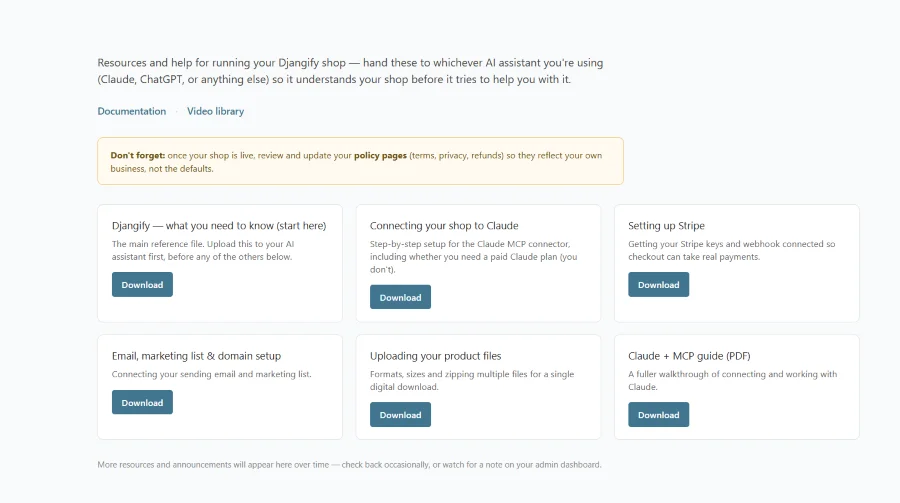
They are not manuals that you need to sit down and read, they are there to hand over to your AI when you need help, just upload the relevant file then ask your question.
Your AI can use the Djangify-specific information to guide you rather than making assumptions about how your eCommerce Builder works and if you use Claude, you can also connect Claude directly to your Djangify shop through the Djangify MCP connector for additional capabilities.
A little more help when you need it without having to explain Djangify from scratch.